Runtime Class for Android

Runtime Class for Android

Developers writing Android applications suffer from a dreadful redeploy time every time they need to test changes to the source code. While runtime class reloading systems are widely used for the underlying programming language, Java, there is currently no support for reloading code on the Android platform. This paper presents a new tool, JRebel.Android that enables automatic runtime class- and resource reloading capabilities for Android. The target of this paper is the Android developer as well as the researcher for which dynamic updating capabilities on mobile devices can serve as a basic building block within areas such as runtime maintenance or self-adaptive systems. JRebel.Android is able to reload classes in much less than 1 second, saving more than 91% of the total redeploy time for small apps, more than 95% for medium size apps, and even more for larger apps.

An acknowledged bottleneck in software development is the redeploy time, that being the total time to reflect code changes into a suitable test scenario. Some programming languages like PHP or JavaScript, by nature, does not suffer from long redeploy times, while others like Java or C# do. In this paper we focus on the Android Platform, [2] for which Java is the programming language utilized. Having inherited static typing from Java leaves Android platform developers without ability to perform class reloading to reflect code changes immediately while developing. While for the standard Java platform, developers can change method bodies of already defined classes, there is currently no such capability on the Android platform. Although, there are some well-adopted approaches for reloading classes in Java, such as, JRebel, [8] Spring Loaded, [1] and DCEVM, [11] (more details on related work in section V), supporting class reloading on the Android platform is further troubled by the fact that applications need to be packaged in a special archive (APK file) where standard Java classes have been transformed to a special register-based bytecode format called DEX. Hence, there is no direct link from a compiled class to its correspondent runtime class definition representation.CodeShoppy

In this paper we present a tool that allows seamless and immediate class reloading on the Android platform. Not only can classes be reloaded, but also changes to resources defined in XML-files etc. are reflected immediately on the running devices. The class reloading engine is based on the traditional JRebel core, with almost full class redefinition capabilities, including adding/removing fields, methods and constructors, making changes to public interface methods as well as changing static field values. The only changes that cannot be performed at the Java language level are changes to the ‘extends’- and the ‘implements’ clauses, rendering the tool able to perform almost any kind of change to the code. Section II will dig into the architectural overview of the tool and describe how the tool works and how it should be operated by developers using it. Section III will present a small proof-of-concept example around two sample apps, which is also showcased in the accompanying video of this tool demonstration paper. In section IV we evaluate the performance of the tool comparing the redeploy time with and without the tool. Section V discusses the most relevant related work, while section VI concludes the paper
 Runtime Class for Android

JRebel.Android has two components – agent running on an Android device and service running on the host (developer’s machine). The primary responsibility of the service component is to watch for changes in the classes and resources directories. Upon finding changes to files the service component prepares them for later reloads by transforming the bytecode according to JRebel’s inner workings and sends them to the agent, telling the agent to perform a reload task. Whenever the agent component receives the files from the service component, it triggers the runtime reloading operation, thus making the offline changes that were picked up by the service component active on the device. The tool is designed with ease of use in mind, so the only required input parameter for the service is the root directory of an Android project. Given this directory the service component automatically locates the Android manifest file, class and resource directories as well as any external libraries and project dependencies. Typically one of two build systems are used when developing Android applications, that being Ant or Gradle. JRebel.Android supports both layouts, and there is even support for some custom project layouts built-in. The first time the service component is started for a given target Android project, it utilizes the Android Debug Bridge (ADB), [3] connection to install the agent as part of the existing Android application. For all subsequent runs, having an ADB connection available is optional. The only requirement thereafter is that the agent is either reachable by ADB or through the network somehow. Again, this is a clear sign of the ease-of-use design principle taken for JRebel.Android, given that it is not always be desirable to test Android applications on physical devices using cables, if the nature of the application requires the user to e.g. move around, or rotate the device a lot. Every time the service component starts up it transforms the bytecode of all classes, prepares resources and sends them to the agent now installed on the device. Upon receiving the preprocessed files the agent component restarts the underlying application now using the reload-enabled files. In order to make reload operations fast, the service component only processes changed files, meaning that the files sent to the agent component for reloads are small.

https://codeshoppy.com/android-app-ideas-for-students-college-project.html
Permission Management Method andUpdate in Android

Permission Management Method and Update in Android

The Android-based IoT(Internet of Things) platform just like the existing Android provides an environment that makes it easy to utilize Google’s infrastructure services including development tools and APIs through which it helps to control the sensors of IoT devices. Applications running on the Android-based IoT platform are often UI free and are used without the user’s consent to registered permissions. It is difficult to respond to the misuse of permissions as well as to check them when they are registered indiscriminately while updating applications. This paper analyzes the versions of before and after an application the update running on the Android-based IoT platform and the collected permission lists. It aims to identify the same permissions before and after the update, and deleted and newly added permissions after the update were identified, and thereby respond to security threats that can arise from the permissions that is not needed for IoT devices to perform certain functions.

The Android-based IoT platform was first unveiled to the public as the developer preview version on December 13, 2016. The Android-based IoT platform provides the technology to develop applications that run on IoT devices based on the Android operating system. It makes it easy to develop applications while leveraging existing Android development tools, Android APIs and Google infrastructure services. Applications that run on the Android-based IoT platform have much in common with those that run on existing Android-based Smartphone. Both applications running on the IoT device and smartphone register permissions to provide users with certain functions. If an application is used differently from its original purpose or asks additional permissions rather than using given permissions to provide certain functions for the user, it can perform malicious activities such as collecting excessive information or leaking personal information [1]. For example, if an IoT device that provides temperature and humidity registered permissions such as location information, camera, package .CodeShoppy

Android-based IoT platform The Android-based IoT platform named “Android-Things” was first unveiled by Google. It is the first platform dedicated to IoT devices. “Android-Things” is an upgraded version of the existing Google’s Internet platform, Brillo. Unlike the C/C++ language used in Brilo, it enables Android developers to easily develop IoT products [2, 3] by using existing Android development tools such as Android Studio, JAVA language, Android SDK in the same way. In addition, the hardware of “Android-Things” includes Intel Edison, Pico NXP, Raspberry Pi 3, etc. Each hardware is equipped with SOC (System On Chip), RAM, and wireless communication devices. “Android-Things” basically supports various sample code examples such as Doorbell and Bluetooth Audio, making it easier for developers to access. 2.2. AndroidManifes.xml file The AndroidManifest.xml file of an application used in the Android-based IoT platform environment has a similar structure to that in the conventional Android smartphone. The AndroidManifest.xml file contains information on the application including <activity>, <Intent-filter>, and <uses-permission> [4-6]. This paper analyzes permissions of the versions of before and after application the update by analyzing the AnadroidManifest.xml file.

Permission Management Method and Update in Android

Permission management method for before and after applications the update 3.1. Analysis flowchart for change of permissions before and after the update The first step in the analysis sequence to compare permissions before and after the application update is to find the AndroidManifest.xml file and then perform ananalysis on the file. The persmissions used by before and after an application the update are first identified based on the analyzed information. After this, the same, deleted, and added permissions in the versions of before and after application the update are checked through the identified information. Figure 2 below shows an analysis flow chart to analyze the permission differences before and after the updatePermission analysis for before and after application the update consists of four steps. The detailed analysis process is as follows. a.Input of the application information before and after the update -Input two versions of the application to analyze before and after application the update. b.Search of the AndroidManifest.xml -Search for the AndroidManifest.xml file to analyze permissions for both versions of the application. During this process, find each AndroidManifest.xml file for before and after application the update c.Check the permissions used by before and after application the update -Analyze the AndroidManifest.xml file found in step 2 to check and list permissions used in before and after application the update d.Identify permission differences for before and after application the update -Based on the analyzed information above, the same, deleted, and added permissions during the update process are identified. Based on the permission information identified through the analysis, respond to security threats such as indiscriminate data collection and data leakage by recognizing them in advance that may occur in Android-based IoT devices.

https://codeshoppy.com/android-app-ideas-for-students-college-project.html

Method for Before and After Applications the Update in Android

Method for Before and After Applications the Update in Android

The Android-based IoT platform was first unveiled to the public as the developer preview version on December 13, 2016. The Android-based IoT platform provides the technology to develop applications that run on IoT devices based on the Android operating system. It makes it easy to develop applications while leveraging existing Android development tools, Android APIs and Google infrastructure services. Applications that run on the Android-based IoT platform have much in common with those that run on existing Android-based Smartphone. Both applications running on the IoT device and smartphone register permissions to provide users with certain functions. If an application is used differently from its original purpose or asks additional permissions rather than using given permissions to provide certain functions for the user, it can perform malicious activities such as collecting excessive information or leaking personal information [1]. For example, if an IoT device that provides temperature and humidity registered permissions such as location information, camera, package installation and deletion, etc., it would perform functions different from the original purpose through the newly registered permissions. This paper collects permission lists for the versions of an application running on the Android-based IoT platform before and after the update. It aims to respond to future security threats by identifying the same, deleted, and added permission information compared to the update based on the collected permission lists. The structure of this paper is as follows. Section 2 discusses the Android-based IoT platform, the AndroidManifest.xml file, and the Android permission protection level. Section 3 performs permission analysis on the application to identify permission differences before and after the update. Finally, section 4 concludes this study of android.codeshoppy

Android permission protection level Android applications must register their permissions in the AndroidManifest.xml file to gain access to the information on the Android device and obtain the user’s consent to the use of permissions. The permission protection level for registered permissions can be specified by the developer. It is classified into Normal, Dangerous, Signature, and SignatureOrSystem. Table 1 below lists the four permission protection levels and its definition [4, 7, 8]

recognizing them in advance that may occur in Android-based IoT devices. 3.2. Source code for permission analysis before and after the update Python version 3.5.3 is used to analyze the permissions of the application used in the Android-based IoT platform environment. Search the AndroidManifest.xml file inside the application based on both of the application input information. Analyze both AndroidManifest.xml files to identify the same and changed permissions before and after the update. The content of the source code is explained as follows Table 2.a.Line 01~02: -The variable pwd1 and pwd2 contain the top-level directory name for analyzing both versions of the application. b.Line 04~12: -Find the AndroidManifest.xml file in the application using the variable pwd1 and pwd2. Generally, the AndroidManifest.xml file is in “/app/src/main/” but sometimes it is not. Therefore, do not always search the same path but search all paths inside the application to find the AndroidManifest.xml file. If the AndroidManifest.xml file is found, open the AndroidManifest.xml file in read mode using the update_before and update_after variable to analyze the information in the AndroidManifest.xml file. c.Line 14~19: -Check the phrase “android.permission” by reading a file line by line. In case permissions are provided by Android, the phrase basically starts with “android.permission”. When this phrase is found, include the permission before and after the update in the update_before and update_after list respectively and identify the deleted or added permissions based on the list information. The identified permissions are kept sorted for the ease of use later.

  Method for Before and After Applications the Update in Android

When the analysis of two versions of the application is completed, the same permissions before and after the update are first printed out on screen. Next, the deleted and newly added permissions after the update are printed out in order. Figure 2 shows the results of analyzing the permissions of before and after application the update. Permissions from [1] through [3] in Figure 2 show the same permissions that exist in both versions of before and after application the update. [4] through [6] indicate permissions that existed in the version of before application the update but were deleted after the update. [7] – [14] shows newly added permissions that did not exist in the version of before application the update but were added in the update process. The permissions that have been deleted or added after the update can be identified through the analysisIoT devices can carry out malicious activities such as collecting personal information indiscriminately or leaking personal information when permissions not related to performing certain functions are added during the update process. To prevent IoT devices from performing such malicious activities, there is a need to analyze threats that may arise from permissions to be added during the application update. Information on permissions that exist in many applications that perform malicious activities has been continuously analyzed through many researches. Table 3 below shows the list of permissions that exist in the malicious applications that have been previously studied [4, 5, 9, 10]. It is sorted in the order most used of permission in the malicious application. Restrictions on the use of permissions in the process of analyzing security threats should be considered since there may be restrictions on using permissions according to IoT devices. Based on the previously researched permission information and the results analyzed in section 3.3, it is necessary to respond to security threats in advance by analyzing them that may occur due to added permissions while updating an application. For example, if an IoT device that provides temperature or humidity asks permissions to control the location information .

https://codeshoppy.com/php-projects-titles-topics.html

Update in Android-based IoT Platform Environment

Update in Android-based IoT Platform Environment

The Android-based IoT(Internet of Things) platform just like the existing Android provides an environment that makes it easy to utilize Google’s infrastructure services including development tools and APIs through which it helps to control the sensors of IoT devices. Applications running on the Android-based IoT platform are often UI free and are used without the user’s consent to registered permissions. It is difficult to respond to the misuse of permissions as well as to check them when they are registered indiscriminately while updating applications. This paper analyzes the versions of before and after an application the update running on the Android-based IoT platform and the collected permission lists. It aims to identify the same permissions before and after the update, and deleted and newly added permissions after the update were identified, and thereby respond to security threats that can arise from the permissions that is not needed for IoT devices to perform certain functions. Codeshoppy

The Android-based IoT platform was first unveiled to the public as the developer preview version on December 13, 2016. The Android-based IoT platform provides the technology to develop applications that run on IoT devices based on the Android operating system. It makes it easy to develop applications while leveraging existing Android development tools, Android APIs and Google infrastructure services. Applications that run on the Android-based IoT platform have much in common with those that run on existing Android-based Smartphone. Both applications running on the IoT device and smartphone register permissions to provide users with certain functions. If an application is used differently from its original purpose or asks additional permissions rather than using given permissions to provide certain functions for the user, it can perform malicious activities such as collecting excessive information or leaking personal information [1]. For example, if an IoT device that provides temperature and humidity registered permissions such as location information, camera, packagenstallation and deletion, etc., it would perform functions different from the original purpose through the newly registered permissions. This paper collects permission lists for the versions of an application running on the Android-based IoT platform before and after the update. It aims to respond to future security threats by identifying the same, deleted, and added permission information compared to the update based on the collected permission lists. The structure of this paper is as follows. Section 2 discusses the Android-based IoT platform, the AndroidManifest.xml file, and the Android permission protection level. Section 3 performs permission analysis on the application to identify permission differences before and after the update. Finally, section 4 concludes this study.

 Update in Android-based IoT Platform Environment

Android-based IoT platform The Android-based IoT platform named “Android-Things” was first unveiled by Google. It is the first platform dedicated to IoT devices. “Android-Things” is an upgraded version of the existing Google’s Internet platform, Brillo. Unlike the C/C++ language used in Brilo, it enables Android developers to easily develop IoT products [2, 3] by using existing Android development tools such as Android Studio, JAVA language, Android SDK in the same way. In addition, the hardware of “Android-Things” includes Intel Edison, Pico NXP, Raspberry Pi 3, etc. Each hardware is equipped with SOC (System On Chip), RAM, and wireless communication devices. “Android-Things” basically supports various sample code examples such as Doorbell and Bluetooth Audio, making it easier for developers to access. 2.2. AndroidManifes.xml file The AndroidManifest.xml file of an application used in the Android-based IoT platform environment has a similar structure to that in the conventional Android smartphone. The AndroidManifest.xml file contains information on the application including <activity>, <Intent-filter>, and <uses-permission> [4-6]. This paper analyzes permissions of the versions of before and after application the update by analyzing the AnadroidManifest.xml file. The followingable 1 shows the structure of the AndroidManifest.xml file for a sample application provided for the use in the Android-based IoT platform environment

https://codeshoppy.com/android-app-ideas-for-students-college-project.html
Teleoperated by an Open Source Android Application

Teleoperated by an Open Source Android Application

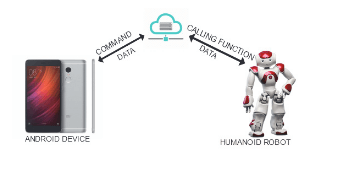
Humanoid RobotThe Humanoid Robot we opted was NAO [14] fromAldebaran Robotics. Aldebaran Robotics is a French-basedcompany, gain popularity in 2004 with a new novel projectknown as NAO. NAO is running OpenNAO OS which is aGNU/Linux distribution based on Gentoo. It supports bothwired IEEE 802.3 and wireless IEEE 802.11 a/b/g/n connec-tion. With a lithium battery inside, has autonomy up to 90minutes (active use). NAO is equipped with two ultrasonicsensors (or sonars) which allow it to estimate the distanceto obstacles in its environment. Also, two identical videocameras are located in the forehead which they provide anup to 1280×960 resolution at 30 frames per second. As aresult, NAO can be a highly effective platform for teleroboticswhen its user tries to start an interaction with people or objectsnearby the robot.A user of our system can manipulate the robot using anAndroid smartphone by observing the surroundings of it froma video feed played on the smartphone display. We createsoftware that is executed on NAO in form of Python and Bashshell scripts files that are necessary for the complete set ofour programmed activities. In our embedded software, we usean ever ended loop that polls the bridge web server everyone second to receive the next command for execution. Afterthe successful execution of the specified command, the robotacknowledges it to the web server in order to be removedfrom the execution queue of the web server. This feedbackmechanism is crucial for the correct execution of the activitiesand ensures that there are not lost events. The communicationbetween the robot and the bridge server is performed by adecimal arithmetic protocol that we have developed in-house.DAndroid ApplicationTo control the humanoid robot we have developed anandroid application. The user has full control of the robot likemove forward, turn left etc. Except of these simple commands,our system has the capacity of speech to text, text to speech,video and audio streaming. With these new features, we havecreated a new way of communication between a blind user anda speech-impaired user. The humanoid robot is the key to thatcommunication by speaking out loud the messages users wantto tell or inputted via text respectively. Except of this new wayof communication, our system can be used for safety purposes.For instance, a father can watch what his child is doing whenhe is not at home.In the first screen of the application there is a button whichis used for the connection between the application and theserver. Also, the user can change the configuration settings bypressing the settings button.The main screen of the application is shown on Figure2. It consists of multiple action buttons which are used tocontrol the NAO. Every time the user presses a functionalitythe Android device sends an HTTP POST request to the bridgeserver and the server appends this to an activity queue. Everytime the humanoid robot polls for a new activity the web servertransmits the activity on the top of the queue. Also, on top ofthe screen, is being displayed video or pictures that are beingtaken by NAO.Our application also has two unique features. Text to speechand speech to text capabilities. In Figure 3 our humanoid robotis giving a voice to people with speech disabilities.The Android application was created in Android Studio.The main programming languages that were used in orderto be created successfully are Java and XML. The minimumSDK for the android application is API 16: Android 4.1(Jelly Bean). Some of the most important libraries we usedare Apache library which was used for the HTTP requestsbetween the android device and the web server, Picasso librarywhich was used to load images from web URLs, AudioFormat,AudioRecord, MediaRecorder that were utilized for the WAVrecording. CodeShoppy

 Teleoperated by an Open Source AndroidApplication

To evaluate the efficiency of our implementation, we arereferring a number of metrics that we have gathered. Specifi-cally, we used our application from the Polytechnic Universityof Catalonia in Barcelona, Spain, in order to remotely controlour Humanoid Robot that was located in Kozani, Greece. Theaverage time it took until the request was made by the mobileand get a response from the server was 0.233 sec. Also, Theaverage time it took for the Audio Streaming was 0.369 secand 0.686 for the Video Streaming. This was measured usinga performance metric function of our android application fromthe time it posted the command to be executed until the time itreceived the successful reply message. Except from Barcelona,we also tested our application from University of Thessaly inVolos, Greece, in order to compare the results. The averagetime it took until the request is made by the mobile and get aresponse from the server was 0.16 sec. Also, the average timeit took for Audio Streaming was 0.347 sec and 0.505 for theVideo Streaming. As we notice, the small differences betweenthe delays from Spain and Greece mean that the application isable to run from all around the world without any considerabledelays.To decide which User Interface (UI) to implement on ourAndroid Application, we surveyed more than 50 people toask them about the user experience that they had over threedifferent User Interfaces that we have created. The age rangeswere: under 18, 18-25, 26-40, 41-55 and 55+. We wanted theapplication to be easy to use from all of the above ages. Theresults of the statistical analysis were that the majority of theusers preferred the minimalist version of the proposed UI’s.Taking into account this survey we ended up with the aboveapplicationInternet of Robotic Things allows robots or robotic systemsto connect and share all under a hood of a sophisticatedarchitectural framework. Our paper proposes an open sourceandroid application for controlling a humanoid robot. Ourapplication has accomplished so much more than any of itspredecessors. The user can view what the robot is seeingthrough the Android application and can also move it. Ad-ditionally, our system can deliver real-time audio through ourapplication. With the use of text to speech and speech to text,our humanoid robot is giving a voice to people with speechdisabilities. In the future, we plan to enhance the system byinserting more functionalities such as face recognition and AI

https://codeshoppy.com/php-projects-titles-topics.html

An Internet of Things Humanoid Robot

An Internet of Things Humanoid Robot

The Internet of Things (IoT) is a system of in-terrelated computing devices, mechanical and digital machines,objects, animals or people that are provided with unique identi-fiers and the ability to transfer data over a network withoutrequiring human-to-human interaction. Nowadays the use ofIoT in industrial robots is very popular contrary to humanoidrobots. There have been a few attempts that combine IoT withhumanoid robots but they have limited features. This paperproposes a novel open source platform Android application forcontrolling a humanoid robot, with more features than otherresearch projects, in remote areas either behind NAT (NetworkAddress Translation) or without it. The user can view whatthe robot is seeing through the Android application and canalso move it. Additionally, our system has the ability to deliverreal-time audio through our application. We envision that ourproposed system is not only an attractive solution for manytelerobotic applications but also an extensive educational toolin special needs education CodeShoppy

The IoT [1] allows objects to be sensed or controlledremotely across existing network infrastructure, creating op-portunities for more direct integration of the physical worldinto computer-based systems and resulting in improved effi-ciency, accuracy and economic benefit in addition to reducedhuman intervention. A thing, in the Internet of Things, can beanything: a person with a heart monitor implant, an automobilethat has built-in sensors to alert the driver when tire pressureis low or any other natural or man-made object that canbe assigned an IP address and provided with the ability totransfer data over a network and many more. According toIDC, worldwide market of internet of things is going to growup around $1.7 trillion up to 2020 [2]. Current research isleading the robotics field to use the internet thus giving birthto the new term Internet of Robotics. The Internet of RoboticThings (IoRT) [3] is a concept first introduced by Dan Kara atABI Research, which talks about augmenting the existing Iowith active sensorization thereby, opening the doors to novelbusiness ideas, at the intersection of both IoT and Robotics.The appearance of a robot is one of the key factors that helpthis to be recognized as a human-like entity [4]. A humanoidrobot is a machine with its overall appearance based on thatof the human body. In general humanoid robots have a torsowith a head, two arms and two legs, although some formsof humanoid robots may model only part of the body, forexample, from the waist up. Some humanoid robots may alsohave a ’face’, with ’eyes’ and ’mouth’. Humanoid robotsare being developed to perform human tasks like personalassistance, where they should be able to assist the sick andelderly, and dirty or hazardous jobs. Regular jobs, like being areceptionist or a worker of an automotive manufacturing lineare also suitable for humanoids. In essence, since they canuse tools and operate equipment and vehicles designed for thehuman form, humanoids could theoretically perform any task ahuman being can, so long as they have the proper software andcareful programming. However, the complexity of doing so isimmense. Also, Humanoid robots can naturally be regardedas learning companions. For instance, two robots visited achildrens elementary school in Japan for two weeks, with thepurpose of teaching children English, with mesmerizing results[5]. Studies show also that the humanoid robots have thepotential to help autistic children learn and express emotions,for nonverbal children with autism can help in engaging themto start a conversation and even express feeling using bodylanguage [6].In contrast with other authors, we have developed an open-source1project which gives a user the ability to control ahumanoid robot remotely, using an android application withan android phone even in restricted internal networks usingNAT (Network Address Translation). Additionally into ourapplication, we have injected video streaming, audio streamingand also text to speech and speech to text services

 An Internet of Things Humanoid Robot

The Humanoid Robot we opted was NAO [14] fromAldebaran Robotics. Aldebaran Robotics is a French-basedcompany, gain popularity in 2004 with a new novel projectknown as NAO. NAO is running OpenNAO OS which is aGNU/Linux distribution based on Gentoo. It supports bothwired IEEE 802.3 and wireless IEEE 802.11 a/b/g/n connec-tion. With a lithium battery inside, has autonomy up to 90minutes (active use). NAO is equipped with two ultrasonicsensors (or sonars) which allow it to estimate the distanceto obstacles in its environment. Also, two identical videocameras are located in the forehead which they provide anup to 1280×960 resolution at 30 frames per second. As aresult, NAO can be a highly effective platform for teleroboticswhen its user tries to start an interaction with people or objectsnearby the robot.A user of our system can manipulate the robot using anAndroid smartphone by observing the surroundings of it froma video feed played on the smartphone display. We createsoftware that is executed on NAO in form of Python and Bashshell scripts files that are necessary for the complete set ofour programmed activities. In our embedded software, we usean ever ended loop that polls the bridge web server everyone second to receive the next command for execution. Afterthe successful execution of the specified command, the robotacknowledges it to the web server in order to be removedfrom the execution queue of the web server.

https://codeshoppy.com/php-projects-titles-topics.html

Senior Citizens with Senior Citizens with Self-Care Android Application

Senior Citizens with Senior Citizens with Self-Care Android Application

The oHealth system architecture as shown in Fig. 1 has five main actors. The first actor is senior citizens with hypertension who can use oHealth by connecting with Wi-Fi or a mobile Internet data in Android device. The second actor is the administrator who maintains the database on Azure SQL Database cloud server. The third actor is doctor, assistant, and family members who receive history data and blood pressure analysis report of senior citizens. The fourth actor is BP5 device which can measure blood pressure. The last actor is azure machine learning which gets all the collected data and analyze hypertension levels for the user. The oHealth application requires the user to register as a member by providing their personal information and log-in. The application offers six main features. The first feature is user profile, which keeps senior’s information. The second feature is measure blood pressure, which measures blood pressure by connecting blood pressure device. The third feature is knowledge, which gives knowledge about hypertension, food, exercise, and medicine. The fourth feature is treatment, which records food dairy, medicine intake, and exercise for using in hypertension analysis and treatment. The fifth feature is reminder, which uses to set reminder to measure blood pressure and take medicines in each day. The last feature is analysis, which analyzes hypertension levels with azure machine learning system by using Multiclass Logistic Regression algorithm [20] to create a predictive model and shows the result to the user. The analysis results and history data can be shared to doctors, assistant, or family members. IV.USER INTERFACEUser interface design of oHealth is based on senior citizens support in mind, according to the principles of a good system design [17]. oHealth design concepts consist of 4 principles, which are use minimalist design to prevent cognitive overload, provide large icons that are easy to interpret and interaction, avoid the use of irrelevant information on the screen, provide maximize contrast and avoid use of bright colors.

The purpose of evaluation is to measure the user satisfaction toward oHealth. The details of the evaluation method are described into three steps. Firstly, introduce and provide essential information to users to comprehend the concepts of oHealth. Secondly, demonstrate the application to them step-by-step. Finally, let the users test the application and ask them to answer aquestionnaire. The questionnaire consists of questions asking about their personal information and key aspects of the application including easy to use and understand, attractiveness and interest, user interface and design, benefits and advantages, adapt to use in daily life. 25 participants in the age of 60 to 70 years were volunteers to use oHealth. Number of male participants (36%) are less than female (64%). They reply questions concerning to the usage of oHealth as shown in Fig. 14. 23participants (or 92%) thought that oHealth is easy to use and not complicate. 21 participants (or 84%) agreed that oHealth is easy to use in daily life especially the measurement because it is always available, so users can use any time and 21 participants (or 84%) judged that oHealth has a simple design and suitable for users. CodeShoppy

Senior Citizens with Senior Citizens with Self-Care Android Application

Our research project intends to introduce the concept of self-care for senior citizens with hypertension by developing an android application that users can prevent, evaluate and treat hypertension. oHealth let users know their blood pressure, exercise hour and sodium intake in each day, medicine intake, hypertension levels and learned to aware or adopt the healthy life style. oHealth could support users to treat hypertension in an appropriate way and measure blood pressureanywhere and anytime especially at home to get the accurately outcome. Moreover, it can give more knowledge about hypertension to users. In thefuture work, to be more useful, oHealth should be extended to connect to other medical devices such as heart rate monitor, glucose monitor, weighing scale and pedometer.

https://codeshoppy.com/android-app-ideas-for-students-college-project.html

Android Application for Senior Citizens

Android Application for Senior Citizens

Currently, most of senior citizens in the worldhave hypertension and the number of patients tend to increase every year because senior citizens do not know how to take care of themselves. They do not know how often and when the best time to measure blood pressure. In order to guide senior citizens with hypertension to take care of themselves, oHealth, a self-care android application, was proposed. By using oHealth application connected with blood pressure device, senior citizens can measure and monitor their blood pressure daily at home anytime. In each day, they can also record about medicines and food intake and exercise for treatment. All records are kept in azure SQL database. Moreover, this application also provides user interface design that is suit for senior citizens. oHealth application has six main functions which are manage profile, measure blood pressure, provide knowledge, record treatment, provide reminders, and perform data analysis by using multiclass logistic regression method in azure machine learning. The ultimate goal of oHealth application is to assist senior citizens to prevent, evaluate, and treat hypertension, and to help them control medicine, food, and exercise to treat hypertension in an appropriate way. CodeShoppy

At present, the number of senior citizens in the world tends to increase every year. As reported by the World Bank the number of senior citizens in the world is around 0.5 billion people or 8.2% and around 74.3% of them have hypertension [1]. In the same way, the number of Thai senior citizens tends to increase. According to the National Statistical Office, the number of senior citizens in Thailand is around 10 million people or 14.9% [2]. The number of senior citizens shows that Thailand’s society will become a senior’s society soon. From the information of Thai Health Promotion Foundation, senior citizens in Thailand is around 4.1 million people or 41.0% who have high blood pressure or hypertension [3]. High blood pressure is the most common risk factor to other diseases such as stroke, kidney disease, paralysis, and so on. Therefore, high blood pressure is a very important disease that needs to be treated. Nowadays, there are many medical devices that can use to monitor people health in ever day life such as heart rate monitor, glucose monitor, blood pressure monitor, pedometer and weighing scale. Blood pressure monitors are also now available to use anywhere. Accordingly, senioritizens can use these devices to measure blood pressure at home.The hypertension patient should measure the blood pressure and take care oneself at home that is the best way to measure blood pressure [4] [5]. Moreover, most of people do not know the factors that impact the value of blood pressure such as body mass index (BMI), eating too much sodium, eating too less potassium, alcohol addiction, smoking, lack of physical activities, stress and taking the medicine according to the doctor. Thus, they should know more the basic knowledge of hypertension. In 2016, smartphone owner in Thailand is about 24 million people and about 2.5% of them are senior citizens [6]. Recently, Thai people are increasingly interested in self-care but most user interface of self-care applications are not friendly for senior citizens e.g. small text, small button [7]. The main objective of this research work is to design and develop a self-care android application for senior citizens with hypertension to guide, track and treat hypertension and to reduce the risk of having other incurrent diseases. Hence, this oHealth application will be a useful tool for senior citizens with hypertension to take care of themselves.

  Android Application for Senior Citizens

senior Citizens The definition of senior citizens from the United Nations is people who are more than 60 years of age. The senior citizen can separate into 4 types which are the young – old (60 to 69 years old), the middle-aged old (70 to 79 years old), the old-old (80 to 90 years of age), and the very old-old (90 to 99 years old). At present, the number of senior citizens in Thailand tends to increase every year. When seniors get older, health problems occur with them in many ways[1]. B.High blood pressure (Hypertension) Normally, blood pressure when the heart pump blood (systolic) is below 120 mmHg and blood pressure when the heart relaxed (diastolic) is below 80 mmHg. Blood pressure can be changed over time, especially when people sleep, wake up, exercise, stress, or exited. But it will be back to normal blood pressure when people finish their activities. If people finish their activities, but the blood pressure still higher than 120/80 mmHg. This means people can have high blood pressure (Hypertension) [8]. High blood pressure can divide into three levels, which are prehypertension (120-139/80-89 mmHg), high blood pressure stage 1 (140-159/90-99 mmHg), and stage 2 (more than 160/100 mmHg) [4]. There are two types of high blood pressure, which consist of primary and secondary high blood pressure. More than 90% of hypertension patients have primary high blood pressure. It is the most common type that occurs in people. And another 10% have secondary high blood pressure. There are many causes, factors and treatmentsof primary and secondary high blood pressure as summarized in Table 1 [8] [9] [10].xisting applications Six interesting applications related to senior citizens with hypertension and oHealth application were explored. Table 2 displays feature comparison of the six applications with oHealth including iHealth[11], Omron [12], Qardio [13], Health Check Up For Free [14], Blood Pressure [15], and Smart health [16]. https://codeshoppy.com/android-app-ideas-for-students-college-project.html
A Self-Care Android Application

A Self-Care Android Application

At present, the number of senior citizens in the world tends to increase every year. As reported by the World Bank the number of senior citizens in the world is around 0.5 billion people or 8.2% and around 74.3% of them have hypertension [1]. In the same way, the number of Thai senior citizens tends to increase. According to the National Statistical Office, the number of senior citizens in Thailand is around 10 million people or 14.9% [2]. The number of senior citizens shows that Thailand’s society will become a senior’s society soon. From the information of Thai Health Promotion Foundation, senior citizens in Thailand is around 4.1 million people or 41.0% who have high blood pressure or hypertension [3]. High blood pressure is the most common risk factor to other diseases such as stroke, kidney disease, paralysis, and so on. Therefore, high blood pressure is a very important disease that needs to be treated. Nowadays, there are many medical devices that can use to monitor people health in ever day life such as heart rate monitor, glucose monitor, blood pressure monitor, pedometer and weighing scale. Blood pressure monitors are citizens can use these devices to measure blood pressure at home.The hypertension patient should measure the blood pressure and take care oneself at home that is the best way to measure blood pressure [4] [5]. Moreover, most of people do not know the factors that impact the value of blood pressure such as body mass index (BMI), eating too much sodium, eating too less potassium, alcohol addiction, smoking, lack of physical activities, stress and taking the medicine according to the doctor. Thus, they should know more the basic knowledge of hypertension. In 2016, smartphone owner in Thailand is about 24 million people and about 2.5% of them are senior citizens [6]. Recently, Thai people are increasingly interested in self-care but most user interface of self-care applications are not friendly for senior citizens e.g. small text, small button [7]. The main objective of this research work is to design and develop a self-care android application for senior citizens with hypertension to guide, track and treat hypertension and to reduce the risk of having other incurrent diseases. Hence, this oHealth application will be a useful tool for senior citizens with hypertension to take care of themselves. CodeShoppy

ormally, blood pressure when the heart pump blood (systolic) is below 120 mmHg and blood pressure when the heart relaxed (diastolic) is below 80 mmHg. Blood pressure can be changed over time, especially when people sleep, wake up, exercise, stress, or exited. But it will be back to normal blood pressure when people finish their activities. If people finish their activities, but the blood pressure still higher than 120/80 mmHg. This means people can have high blood pressure (Hypertension) [8].High blood pressure can divide into three levels, which are prehypertension (120-139/80-89 mmHg), high blood pressure stage 1 (140-159/90-99 mmHg), and stage 2 (more than 160/100 mmHg) [4]. There are two types of high blood pressure, which consist of primary and secondary high blood pressure. More than 90% of hypertension patients have primary high blood pressure. It is the most common type that occurs in people. And another 10% have secondary high blood pressure. There are many causes, factors and treatmentsof primary and secondary high blood pressure as summarized in Table 1 [8] [9] [10] .

 A Self-Care Android Application

The oHealth system architecture as shown in has five main actors. The first actor is senior citizens with hypertension who can use oHealth by connecting with Wi-Fi or a mobile Internet data in Android device. The second actor is the administrator who maintains the database on Azure SQL Database cloud server. The third actor is doctor, assistant, and family members who receive history data and blood pressure analysis report of senior citizens. The fourth actor is BP5 device which can measure blood pressure. The last actor is azure machine learning which gets all the collected data and analyze hypertension levels for the user. The oHealth application requires the user to register as a member by providing their personal information and log-in. The application offers six main features. The first feature is user profile, which keeps senior’s information. The second feature is measure blood pressure, which measures blood pressure by connecting blood pressure device. The third feature is knowledge, which gives knowledge about hypertension, food, exercise, and medicine. The fourth feature is treatment, which records food dairy, medicine

https://codeshoppy.com/android-app-ideas-for-students-college-project.html

Comparison of Periodic Behavior of Consumer Online Searches for Restaurants Based on Search Engine

Comparison of Periodic Behavior of Consumer Online Searches for Restaurants Based on Search Engine

Increased knowledge about the online search behavior of restaurant consumers is valuableto restaurant management and marketing professionals. However, people in different countries may demon-strate distinctive online search behaviors. There has been a lack of cross-cultural research on the online searchbehavior of restaurant consumers. In this paper, the periodic nature of online search behavior demonstrated byrestaurant consumers from U.S. and China is analyzed and compared using Fourier transform and Parseval’stheorem. The search interest records from Google and Baidu, respectively, are used. The results reveal thatthe online search behavior of restaurant consumers in the U.S. is strongly governed by weekly cycles but lessdependent on annual cycles; however, the analogous consumer behavior in China exhibits less dependenceon weekly cycles. The theoretical and practical implications of the research are discussed.

As culture so clearly shapes consumer behavior [36], hos-pitality and tourism researchers have sought to identify andunderstand cultural differences to provide useful informa-tion to industry practitioners [39]. For example, Moneyand Crotts [38] indicated that consumers from differentcultures tended to seek out travel and planning infor-mation from different sources; Baeket al.[60] (2006)reported that consumers from different cultures used dis-tinct restaurant selection criteria. Consumers have madeextensive use of search engines to seek out commercialinformation. This makes internet marketing very impor-tant [2], [28], [42], [43], [47], [53], [54], [57] and leadssellers and marketers to compete for higher search enginerankings and to increase their bids for internet advertisementspace. An optimal marketing strategy should consider con-sumer search behavior [17], [29], Nica, [61] (2013). It is thusvery meaningful to study and compare the patterns of onlineinformation search behavior among consumers from differentcountries. However, there has been a lack of research withsuch a focus.In this study, the periodic nature of consumer online searchbehavior, as it applies to restaurant searches in the UnitedStates (U.S.) and China, is analyzed and compared. Thesearch interest records from Google and Baidu, the most pop-ular search engines in the U.S. and China, respectively, areused to generate the material for analysis. Parseval’s theoremis used to quantify the weight of the periodic componentsin the whole search dynamic system obtained by discreteFourier transform (DFT). The results indicate that periodicpatterns exist in the behavior of consumer online searchesfor restaurants in the U.S. and in China, but consumers fromthe U.S. and China exhibit distinctive periodic patterns ofbehavior for online restaurant searches. The cyclic patterns ofconsumer behavior for online restaurant searches identified inthe two study countries are useful to international restaurantmanagement personnel and online marketing professionals.Following this brief introduction, the rest of the study is presented in the following order: literature review, datadescription, method, results, discussion, and conclusion.

1Toll Gate App For Android Based Payment based android app
2Android App for Student Attendance System
3Android App for College Management System
4ebanking App to Manage Account And Transfer
5Grocery Shopping Android App
6Android Courier Management System Using SMS Alert
7eCommerce Old Book Store Shopping with eWallet Android App
8Android Smart Restaurant Management System in near-Field Communication

In this research, the cyclic consumer behavior of onlinerestaurant searches in the U.S. and China was analyzed.Parseval’s theorem was used to quantify the weight of cyclicpatterns in the whole searching dynamics. The study showedthat consumers in both the U.S. and China follow cyclicpatterns for online restaurant searches with the same periods,but Americans are more likely to arrange dining activities ona weekly basis, while the Chinese do not arrange this activityas regularly as Americans. This finding agrees with the Hofst-ede’s original finding of an uncertainty avoidance differencebetween the two countries. This work is expected to be usefulfor international restaurant management personnel and onlinemarketing professionals. Future work aimed at analyzing thecyclic patterns of online restaurant search behavior in othercountries is needed.

IOIO hardware features to Android Apps

IOIO hardware features to Android Apps

mobile based college student communication portal android app source code

While each of the products mentioned in the previous section provides an interesting product that simplifies whether Electronics or programming, all of them tend to be very specific. They focus whether on HW only or SW only. Even if a HW product comes with its developing environment, it still requires advanced programming knowledge. The objective in this paper is to link the features of existing HW & SW products and combine them to get a better platform that offers the user the possibility to create hardware prototypes and program them quickly without needing technical knowledge especially in programming. An electrical board named IOIO is used as the hardware part, while the App Inventor platform is used as the software platform

mobile based college student communication portal android app source code

IOIO is an electrical board that adds hardware I/O features to a PC or android application [14]. The board can be controlled from a distance using Bluetooth, so it is possible to program and control it via a Smartphone mobile App. The IOIO board has a java library and is compatible with Android OS, therefore, it is possible to create Android apps that control the board’s different pins. Which leads to the next point: programming Android is complex, so it would be great if this task were easier. That is the role of the App Inventor platform, which is an online platform that allows the user to create Android Apps just by interconnecting graphical blocks. mobile based college student communication portal android app source code The concept is based on the Blockly interface [15]. There is no Java code to write, no need to consider Android constraints, and the design and script interface are simple and intuitive. With this platform, even kids are capable of creating interesting projects. The existing features makes interfacing complex components easier, such as reading smartphone’s sensors, camera, microphone etc. The downside with App Inventor, however, is that it cannot control the IOIO board, the dedicated SW component does not exist in the platform. Therefore, the contribution of this paper is to bring support for this electrical board to App Inventor. This way, it will be possible to easily create Android Apps that control the IOIO board without technical knowledge. Making it possible for kids and beginners to initiate to the electronics and programming fields. The targeted audience is quite large especially that Android market share has reached 86.1% [16].

The final objective of IoT is to leverage abstraction as much as possible, with electronics and programming considered as main disciplines of IoT, several efforts are made to make them accessible for everyone. This paper presents an initiative that facilitates the process of creating Android Apps capable of controlling electrical systems. IOIO and App Inventor already exist, but do not coexist, the idea then is to develop an Android service that links the two existing solutions and get the best of both worlds. This has added an abstraction level to program the IOIO board, allowing its control via App Inventor’s graphical blocks, thus simplifying the programming side. https://codeshoppy.com/android-project-with-source-code-students.html For the HW side, dealing with electronics can be simpler by using existing HW modules, so it is actually possible to start exploring the embedded systems field with the proposed tools. The developed Android IOIO service supports so far the DigitalWrite command. The service is still under development and other commands such as Digital & Analog and PWM will be added, making it possible to interface additional electrical components and read data from sensors connected to the IOIO board.

INTERFACING THE ROBOT SYSTEM WITH COMMUNICATION MODULE BLUETOOTH

INTERFACING THE ROBOT SYSTEM WITH COMMUNICATION MODULE BLUETOOTH

mca mini project topics 2019

mca mini project topics 2019

Earlier methods used were: First, the use of an onboardcontrol system, which requires a human to control therobot/ machine by using onboard commands/buttons. Second,wired control system, which requires handling of bulkywires and limits the control length.Third, wireless dedicates remote system, requiredifferent remotes for various machines, prone todisturbance and can be hacked easily as there is notprotected transmission of signals, anyone with thefrequency can send commands.

Android application with robotics is an exciting areafor human computer interface that is used to assisthumans to control the mechanical system via software.Here, we designed an android application to control robot/machines wirelessly using a secured connection overBluetooth

The basic considerations for proposed segments are:Interfacing the robot system with communicationmodule Bluetooth (Embedded Hardware Model) Bluetooth Module with android application(Software Model). mca mini project topics 2019 The input from android application is processed usingcommand and understanding algorithms to parse intocontroller that will control the robot. A communicationprotocol that effectively translate the selected commandinto maneuverable tasks to any control board.

https://codeshoppy.com/latest-mca-project-topics-2018.html

Driving MotorsA combination of four 100RPM motors (12V, 1A) with spurgearbox system are used to drive four wheels of the robot. 2.Arduino MegaArduino Mega 2560 based on ATmega 2560 is used as main brain of the hardware. It takes input from the sensors mounted on chassis. Suitable decision is made by Arduinoand actuators are governed accordingly for motionand implementing different selected operations. 3.Voltage Divider Voltage divider used here provides two voltage distribution one is 5V (for logic operations) and other is 12V (for motors). 4.TyresTread block tyres are used with 4.5” diameter for better gripping and push on landapplications. 5.Bluetooth Bluetooth gives connectivitybetween two devices using particular MACaddress. 6.Motor Driver (L298N based) Motor driver board based on L298N is used to drive the motors for motion.

Minimizing Android GUI Test Suites

Minimizing Android GUI Test Suites

simple mobile app project ideas for students

simple mobile app project ideas for students

In recent years, there has been a significant surge in the usage anddevelopment of apps for smartphones and tablets. Developers arewriting more apps for mobile platforms than for desktops. The com-plexity of mobile apps often lies in their graphical user interfaces(GUIs). Testing efforts of such apps mostly focus on the behaviorof graphical user interfaces.Several automated GUI testing techniques have recently beenproposed. The techniques include learning-based testing [8,29,31,32], model-based testing [1,23,45], genetic programming [27,28],fuzz testing [25,26,37], and static-analysis based approaches [4,33,34,44,49]. The goal of the majority of these techniques is to achievegood code and screen coverage (i.e. covering all distinct screens ofan app), and to find common bugs such as crashes and unrespon-siveness. Most of these techniques work by injecting sequences ofautomatically generated user inputs or actions to an app for severaltens of hours. We consider each sequence of actions injected bythese techniques to be atest case, and the set of all sequences ofactions to be atest suite.

Although automated GUI testing techniques could find bugs,they tend to generate large test suites containing thousands oftest cases. Each test case can contain tens to thousands of useractions. Such a large test suite can take several hours to execute,because the running time of a test suite is linear in the size of thetest suite.1However, regression tests should be fast so that theycan be used frequently during development. Therefore, such testsuites are difficult to use in regression testing.In this paper, we address the problem of generating a smallregression GUI test suite for an Android app. We assume that weare given a large test suite generated by an existing automatedGUI testing tool. simple mobile app project ideas for students We also assume that the test suite is replayablein the sense that if we rerun the test suite multiple times we getthe same coverage and observe the same sequence of app screens.(The evaluation section has details on how to obtain a replayable test suite from an automated GUI testing tool.) We assume thatthe test suite takes several hours to run on the app.

Our goal is tospend a reasonable amount of time, say a day, to generate a smallregression test suite for the app that runs for less than an hour andthat achieves similar code and screen coverage as the original testsuite provided as input.A couple of techniques have been proposed to minimize testsuites for GUIs. For example, Clapp et al. [7]and Hammoudi et al.[17]proposed delta-debugging [48] based algorithms. These tech-niques work well if the size of the input test suite is small, containingless than one thousand user inputs. However, they fail to scale forlarge test suites because they depend heavily on the rapid gen-eration and feasibility checking of new test cases. Unfortunately,for most real-world GUI apps, it takes few minutes to check thefeasibility of a new input sequence. Therefore, for large test suitescontaining tens of thousands of user actions, a delta-debuggingbased approach could take more than a month to effectively mini-mize a test suite. McMaster and Memon[30]proposed a GUI testsuite reduction technique for reducing the number of test cases ina test suite. However, this technique does not make any effort toreduce the size of each test case. In our experimental evaluation, weobserved that test cases generated by an automated tool can containsubsequences of redundant user actions, which can be removed toobtain smaller test suites.We propose an Android GUI test suite reduction algorithm thatcan scalably and effectively minimize large test suites. The keyinsight behind our technique is that if we can identify and removesome common forms of redundancies introduced by existing au-tomated GUI testing tools, then we can drastically lower the timerequired to minimize a test suite.

We manually analyzed test suitesgenerated by existing automated GUI testing tools and found thereare three kinds of redundancies that are common in these testsuites: 1) some test cases can be safely removed from a test suitewithout impacting code and screen coverage, 2) within a test case,certain loops can be eliminated without decreasing coverage, and3) many test cases share common subsequences of actions whoserepeated execution can be avoided by combining fragments fromdifferent action sequences. Based on these observations, we devel-oped an algorithm that removes these redundancies one-by-onewhile preserving the overall code and screen coverage of the testsuite.In order to identify redundant loops and common fragments oftest cases, we define a notion of state abstraction which enablesus to approximately determine if we are visiting the same abstractstate at least twice while executing a test case. If an abstract stateis visited twice during the execution, we have identified a loopwhich can potentially be removed. Similarly, if the executions oftwo test cases visit an identical subsequence of abstract states, weknow that fragments from the two test cases can be combined toobtain a longer test case which avoids re-executing the commonfragment. Whenever we get a new test case by removing a loopor by combining two fragments, the resulting test case may nottraverse the same abstract states as expected. In our algorithm,we check the feasibility of a newly created test case by executingit a few times and by checking if the execution visits the samesequence of abstract states every time—we call thisreplayability. https://codeshoppy.com/android-app-ideas-for-students-college-project.html We noticed that if our state abstraction is too coarse-grained ourfeasibility checks often fail, leading to longer running time.

On theother hand, if we use a too fine-grained state abstraction, we fail toidentify many redundancies. One contribution of this paper is todesign a good enough abstraction that works well in practice.One advantage of our algorithm over delta-debugging or otherblack-box algorithms is that we do not blindly generate all possiblenew test cases that can be constructed by dropping some actions.Rather, we use a suitable state abstraction to only drop potentiallyredundant loops. Another advantage is that we create new test casesby combining fragments from input test cases. This enables us tocome up with new, longer test cases which cannot be generatedusing delta-debugging or other test suite reduction techniques.Longer test cases are usually better than multiple shorter test casesbecause we do not have to perform a clean restart of an app. A cleanrestart of an app requires us to kill the app, erase app data, anderase SD card contents, which is very time consuming.

A longertest case in place of several shorter test cases avoids several suchexpensive restarts.We have implemented our algorithm in a prototype tool, calledDetReduce, for Android apps. The tool is publicly available at https://github.com/wtchoi/swifthand2. We applied DetReduce to severalapps and found that DetReduce could reduce a test-suite by a factorof 16.2×in size and a factor of 14.7×in running time on average. Wealso found that for a test suite generated by running SwiftHand [5]and a random testing algorithm [5] for 8 hours, DetReduce canreduce the test suite in an average of 14.6 hours. We are not awareof any existing technique that could get such huge reduction inthe size of a large GUI test suite in such a reasonable amount oftime. Note that DetReduce often runs longer than generating alltest cases; however, running DetReduce is a one-time cost. Once aregression suite has been generated, it will be run many times andeach run will take a fraction of the time required to generate alltest cases.

Update in Android-based IoT Platform

Update in Android-based IoT Platform

android projects titles topics ideas

The Android-based IoT(Internet of Things) platform just like the existing Android provides an environment that makes it easy to utilize Google’s infrastructure services including development tools and APIs through which it helps to control the sensors of IoT devices. Applications running on the Android-based IoT platform are often UI free and are used without the user’s consent to registered permissions. It is difficult to respond to the misuse of permissions as well as to check them when they are registered indiscriminately while updating applications. This paper analyzes the versions of before and after an application the update running on the Android-based IoT platform and the collected permission lists. https://codeshoppy.com/android-projects-titles-ieee.html It aims to identify the same permissions before and after the update, and deleted and newly added permissions after the update were identified, and thereby respond to security threats that can arise from the permissions that is not needed for IoT devices to perform certain functions.

android projects titles topics ideas

The Android-based IoT platform was first unveiled to the public as the developer preview version on December 13, 2016. The Android-based IoT platform provides the technology to develop applications that run on IoT devices based on the Android operating system. It makes it easy to develop applications while leveraging existing Android development tools, Android APIs and Google infrastructure services. Applications that run on the Android-based IoT platform have much in common with those that run on existing Android-based Smartphone. Both applications running on the IoT device and smartphone register permissions to provide users with certain functions. If an application is used differently from its original purpose or asks additional permissions rather than using given permissions to provide certain functions for the user, it can perform malicious activities such as collecting excessive information or leaking personal information [1]. For example, if an IoT device that provides temperature and humidity registered permissions such as location information, camera, package installation and deletion, etc., it would perform functions different from the original purpose through the newly registered permissions. android projects titles topics ideas This paper collects permission lists for the versions of an application running on the Android-based IoT platform before and after the update. It aims to respond to future security threats by identifying the same, deleted, and added permission information compared to the update based on the collected permission lists. The structure of this paper is as follows. Section 2 discusses the Android-based IoT platform, the AndroidManifest.xml file, and the Android permission protection level. Section 3 performs permission analysis on the application to identify permission differences before and after the update. Finally, section 4 concludes this study.

Android Communication Analysis with Intent Revision

Android Communication Analysis with Intent Revision

mca php project topics 2019 computer science

mca php project topics 2019 computer science

Android applications (also called Androidapps) have been proved the effective target.Google Play store has provided billions of Android apps, but unfortunately, the advance has a dark side because security cannot be ensured by many Android apps. Hence, more and more attention has been paid to Android malware. Taint flow analysis has been proved an effective approach to providing potential malicious data flows. It aims at determining whether a sensitive data flows from a source to a sink. The analysis can be executed either dynamically or statically. Dynamic taint analysis [5] relies on testing to reach a appropriate code coverage criterion. It is able to precisely pinpoint leaks, but may be incomplete in exploring all possible executing paths. In contrast, static analysis takes all the possible paths for consideration. But most of the static analyses available for Android apps [1,3] are inner-component based analysis which are unable to detect leaks across-components.Even though most of the privacy leaks happen in a single com-ponent, lots of inter-components privacy leaks have been reported. mca php project topics 2019 computer science Thus, inner-component taint analysis is not enough to detect leaks.Efforts have also been devoted to implement static analysis for An-droid [2]to supply us with a relatively satisfactory outcome. Among them, Inter-Component Communication (ICC) [4] analysis plays important roles since ICC values can facilitate a precise consequent.However, the current ICC analyses only consider ICC links be-tween components where reuse and revision of an Intent across-component are not considered. Thus, lots of potential leaks will escape from being tracked in the succeeding ICC leak detection.With this motivation, in this paper, we devote to ICC analysis on reused and revised Intents. To do so, first, ICC values are analyzed by taking reused and revised Intents into account. With this basis,target components of Intents are analyzed and ICC Graphs are built.On an ICCG, all the ICC flows, which are useful in tracking leaks across-components, are contained. This will lay a critical foundation to the succeeding taint flow analysis. The proposed approach has been implemented in a tool called ICC-Analyzer (ICCA) where IC3is integrated in for providing ICC values of the Intents which are not reused or revised.

We have implemented our approach in a tool named ICCA to analyze ICC values with ICIR and construct ICCGs of Android apps for the convenience of the succeeding ICC leak detection. The evaluation of our approach addresses the following two research questions:(1) How does ICCA perform when analyze ICC values with ICIR?and (2) As an ICC analysis tool for Android apps, how ICCA can precisely match the targets of Intents?

CC Analysis with ICIRBy experiments, we can obtain that 37 and 36revised Intents existin GooglePlay and MalGenome, respectively. We apply ICCA in analyzing ICC values of the 73revised Intents. Table 1 illustrates abird’s eye view of the whole experiment. The l.h.s of Table 1 shows the seven attributes Action,Category,Type,Data,Flag,Extra, and Component of the 37 different revised Intentsin GooglePlay. Ther.h.s illustrates the attributes of the 36revise Intentsin MalGenome.Note that in the table, ‘–’ means that the relative value is captured but not modified, and ‘√’ indicates that the revised value is successfully acquired. As shown in Table 1, ICC values of all the 73revisedIntentsare successfully captured which are unable to be obtained by all the existing ICC analysis tools

In this part, we illustrate the target components of different Intentsin GooglePlay and MalGenome matched by ICCA. The results are compared with the target components matched with IC3. https://codeshoppy.com/php-projects-titles-topics.html All the Intents are classified into three categories: explicit, implicit and reused ones. We record the numbers of Intents in different categories and numbers of the matched target components.The results on GooglePlay and MalGenomeare presented in Ta-ble 2. The first column are the sets of data; the second one shows the categories of Intents; the third one illustrates the numbers of the involved Intents in the relative category. The right-most two columns present the numbers of the target components identified by IC3 and ICCA, respectively. As shown in the experiment, both IC3 and ICCA can identify most of the explicitly defined target components of In-tents (94.8% inGooglePlay and 98.7% inMalGenome). For implicitones, a small part (1.3% inGooglePlay and 0.7% inMalGenome) of them are acquired by ICCA whereas null of them can be obtained by IC3. The success rate of ICCA is low since implicit Intents are frequently used to launch target components in other apps which cannot be acquired without the runtime environment. Thus, our re-sult is reasonable. For the reused Intents, ICCA can acquire almost all the target components while null of them are acquired by IC3. In this experiment, we compare the results of ICCA in ICC analysis only with the newest ICC analysis tool IC3 as it is an improvement of Epicc. To be best of our knowledge, IC3 and Epicc are the only ICC analysis tools publicly available